
| Prev | Next |
| Product: | PageStream 4.1.6.21 (All Platforms) | Reported By: | Tim Doty | |
| Severity: | Normal | Assigned To: | Deron Kazmaier | |
| Priority: | Average | sign in to watch (1 is watching) | ||
| Status: | New | Reported: | 2004-08-15 18:38:00 | |
| Category: | Text Editing | Updated: | 2004-08-15 18:38:00 | |
| Summary: | Text misflowed around object | |||
| Keywords: | text flow,text wrap | |||
| Attached Files: | pgs-misflowedtext.png | Len:39,903 bytes | MD5:388145ecc5bcd1816cba703ac8a61bc7 | Illustration showing incorrect text flow |
| Sign In to add a file. | ||||
In some cases text is not flowed correctly around an object. I have a picture which shows the misalignment. Specifically, the sans serif word "Region" is not left aligned even though it is a standalone paragraph (header, actually). The immediately preceeding paragraph looks like it is cut off, but it is not (in the middle of editing). The object text is flowing around has a 1/32" margin on all sides and it looks to me like the paragraph "Region" is left aligned with that 1/32" left margin rather than being dropped to a new line (there *is* a hard return preceeding it). If I hit return again (so that there are *two* returns preceeding "Region") then there is a blank line (as expected from that case) between the preceeding paragraph and "Region". Or, if I delete the letter 'e' from the final word ("the") in the preceeding paragraph "Region" drops as it should to the following line. In short, there appears to be a region wherein the new paragraph is started aligned with the object's left text offset rather than dropping to form a new line.
| |
| Add a Comment | |
| Sign in to add a comment. |

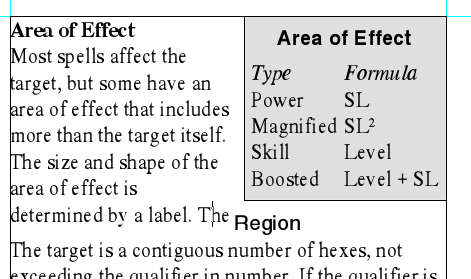
Bug #11 - Text misflowed around object by Tim Doty text flow,text wrap
created:2004-08-15 18:38:00 last updated:2004-08-15 18:38:00
Copyright © 1985-2026 GrasshopperLLC. All Rights Reserved.
| sign in to add a bug |